

Generic SIEM Integration
Integrate TrapEye with any SIEM platform to forward threats and interaction logs in real-time. TrapEye supports integration with all major SIEM solutions through three distinct connectors.
Our connectors are designed for seamless integration, minimizing configuration effort and ensuring rapid operational deployment.
TrapEye Connector Configuration
Section titled “TrapEye Connector Configuration”On the Integrations page of the TrapEye platform, you will find three available connectors:
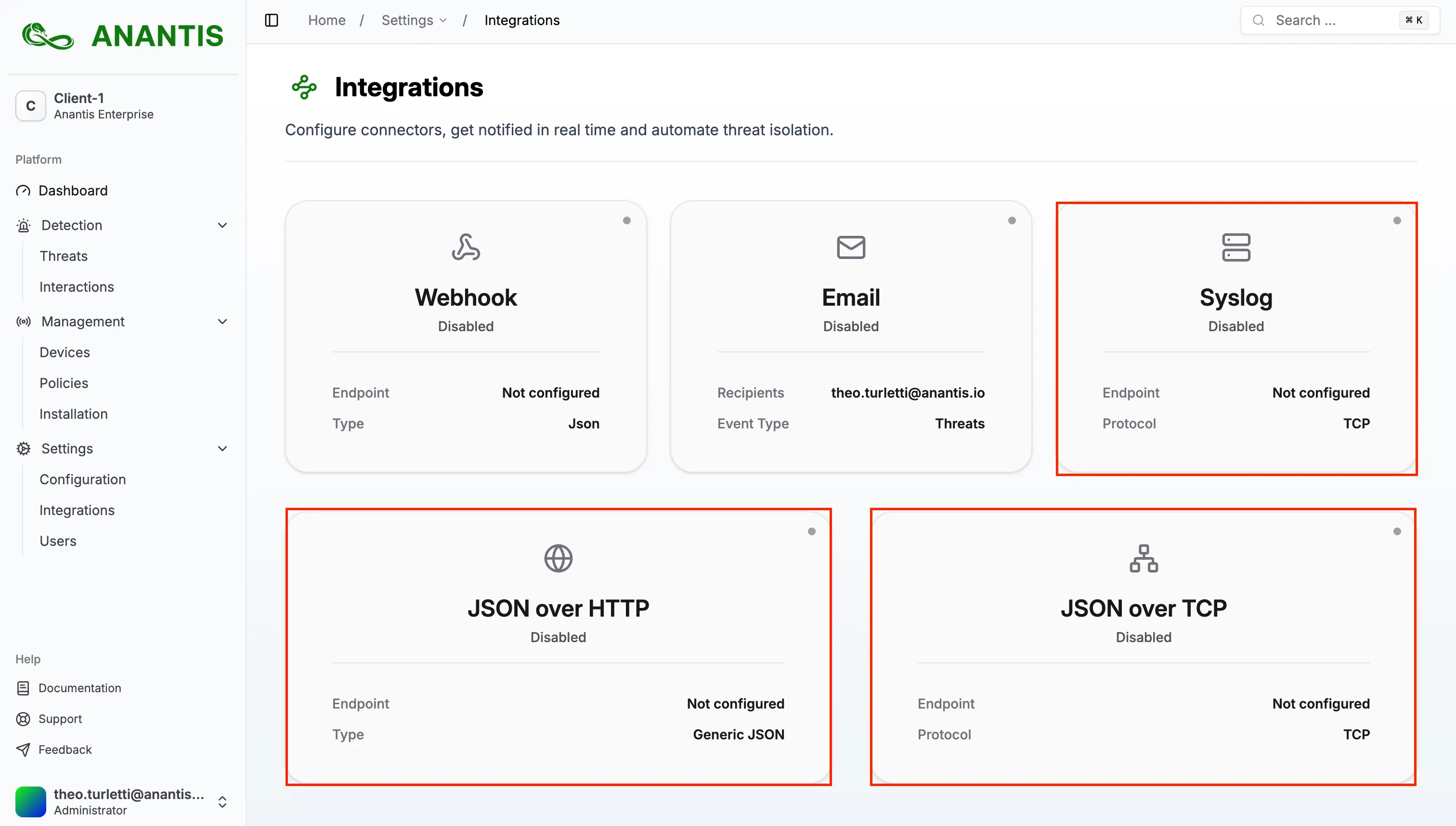
Select the connector that best fits your SIEM solution and follow the on-screen instructions to configure it.
For complete details on the event structure and fields, see the Event Schema Reference.
Syslog Connector
Section titled “Syslog Connector”The Syslog connector encapsulates TrapEye JSON events within standard syslog messages, compatible with all syslog-compliant SIEMs.
How it Works
Section titled “How it Works”- Events are wrapped in RFC-compliant syslog messages
- The JSON payload is placed in the message field
- Supports both RFC 5424 (modern) and RFC 3164 (legacy) formats
Syslog Format Examples
Section titled “Syslog Format Examples”RFC 5424 (Structured Syslog):
<134>1 2026-01-23T23:52:17.826879Z trapeye.anantis.io TrapEye 0 6 - {"additional_data":{...},"event":"new_interaction",...}RFC 3164 (BSD Syslog):
<134>Jan 23 23:52:23 trapeye.anantis.io TrapEye[0]: {"entity_uuid":"0e28f730-18c1-429a-821e-5282cf641dd4","event":"new_threat",...}Configuration Options
Section titled “Configuration Options”- Host: Target syslog server hostname or IP address
- Port: Syslog port (default: 514)
- Protocol: UDP, TCP, or TCP with TLS
- RFC Format: Choose between RFC 5424 or RFC 3164
- Source Hostname: Customize the syslog source identifier
- Certificate Verification: For TLS connections
TCP-JSON Connector
Section titled “TCP-JSON Connector”The TCP-JSON connector streams TrapEye events over a raw TCP connection with newline-delimited JSON. This is the most efficient option as it uses a single persistent socket connection.
How it Works
Section titled “How it Works”- Events are sent as pure JSON over TCP
- Each event is separated by a newline character (
\n) - Single persistent socket connection for all events
Example Event Stream
Section titled “Example Event Stream”{"entity_uuid":"0e28f730-18c1-429a-821e-5282cf641dd4","event":"new_threat",...}{"additional_data":{...},"event":"new_interaction",...}Configuration Options
Section titled “Configuration Options”- Host: Target SIEM hostname or IP address
- Port: TCP port for the SIEM listener
- TLS/SSL: Enable or disable encrypted transport
- Certificate Verification: Choose whether to verify TLS certificates
HTTP-JSON Connector
Section titled “HTTP-JSON Connector”The HTTP-JSON connector sends TrapEye events via HTTP POST requests with JSON payloads. This is the most versatile option, compatible with most modern SIEM platforms and log collectors.
How it Works
Section titled “How it Works”- Events are sent via HTTP POST requests
- Content-Type header is set to
application/json - Events are sent in real-time as they occur
- 3 custom headers can be configured to match your SIEM requirements (e.g.,
Authorization,X-API-Key, etc.) - One HTTP request per event
Example HTTP Request
Section titled “Example HTTP Request”POST <your-endpoint-url> HTTP/1.1Host: <your-siem-host>Content-Type: application/json
{"entity_uuid":"0e28f730-18c1-429a-821e-5282cf641dd4","event":"new_threat",...}Configuration Options
Section titled “Configuration Options”- Endpoint URL: The HTTP endpoint of your SIEM or log collector
- Custom Headers: Up to 3 configurable headers for authentication or routing
- TLS/SSL: Enable or disable encrypted transport
- Certificate Verification: Choose whether to verify TLS certificates (useful for self-signed certificates)
Verify Log Flow
Section titled “Verify Log Flow”Once a connector is enabled, you can use the Test Connection button on its configuration page to ensure logs are being forwarded correctly.